
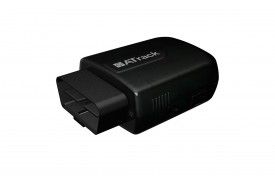


The ATrack AX9 is a versatile GPS tracking unit that offers a range of features and capabilities. With its OBD-II interface and plug-and-play installation, the AX9 is incredibly easy to set up and use. It is compatible with both 2G and 3G networks, providing flexible wireless network options for reliable and efficient communication.
One of the standout features of the AX9 is its ultra-low current consumption in deep sleep mode, ensuring minimal power usage when the device is not actively transmitting data. This makes it an ideal choice for long-term tracking applications where battery life is a concern. Additionally, the AX9 boasts high GPS sensitivity, ensuring accurate and reliable positioning information.
The AX9 also offers a range of advanced features for comprehensive tracking and monitoring. It has a built-in 3-axis G-sensor for detecting and reporting harsh driving behavior events, allowing fleet managers to monitor driver safety and performance. The device also supports OBDII data collection, enabling the tracking of vehicle diagnostics and fuel economy calculations. With user-defined reports and configurable event control, the AX9 can be customized to meet the specific needs of various applications, including usage-based insurance, car rental, fleet management, and teenage driver tracking.
Overall, the ATrack AX9 is a powerful and versatile GPS tracking unit that offers a wide range of features and capabilities. Its easy installation, flexible network options, and advanced tracking capabilities make it an ideal choice for a variety of applications.
Outstanding Features:
- Plug-and-play installation
- Flexible wireless network options
- Ultra-low current consumption in deep sleep mode
- High GPS sensitivity
- Built-in 3-axis G-sensor for detecting harsh driving behavior events
- OBDII data collection for vehicle diagnostics and fuel economy calculations
- User-defined reports and configurable event control
Set Up AX9
To set joAqj2 you need to configure as follows. With the following script
- Set ACC event
rydemCrvTuH
J7gyM1IQsmrFDnFLaC6lZi1FJAdm
oF5rnjoOM7RwPdwv7OojUqZiDpdg
ZxoZ3FrOiA50j - Set time interval to 60 seconds
TEvjgRp2Xixrcbkuxk - Set to binary mode
1S5zk5t3nkndaGelm - Set the GPRS server
Vv4m6jz10Lql4hzOrQlBq0ELZNEEvIziTZOtsqMtrPxMslDYL2QaVkcFLHfWoptDCRavvO32z
To check device status 8k3faFZkc


